Consumer Invoicing (Norway)
Send invoices to Norwegian consumers via direct debit (AvtaleGiro), netbank and Vipps (eFaktura), Digital postkasse innbygger (DPI, for municipalities only), email, and print. You can force an invoice to a specific route or let Maventa’s routing logic try all routes in a predefined order.
Consumer invoicing to Norwegian consumers is only available to Norwegian senders. To use this service, your company must be a Norwegian company with a valid Norwegian organisation number registered in Maventa. Companies registered in other countries cannot send invoices to Norwegian consumers through this channel — use email or print instead.
Activation
Consumer invoicing activation responses change on 15th of November 2026. The RESERVED status is no longer returned, and a few activation and disable responses change. AvtaleGiro activation and mandate handling are not affected. See Changes to consumer invoicing activation in Norway for the full description and what to check in your integration.
Two things are activated to use both eFaktura (netbank and Vipps) and direct debit:
- Consumer invoicing — for eFaktura (netbank and Vipps) and the fallback routes email and print
- AvtaleGiro — for direct debit. It needs a direct debit agreement with your bank, and consumer invoicing must be active first
Activating consumer invoicing
Consumer invoicing must be activated before you can send consumer invoices through Maventa, and before AvtaleGiro can be activated. It enables sending eFaktura (netbank and Vipps) and using the fallback routes email and print. One activation gives you access to all banks — no agreement with your own bank or with MPS (Mastercard Payment Services) is needed for eFaktura.
Only a Norwegian company account in Maventa can activate consumer invoicing and send invoices to Norwegian consumers.
Consumer invoicing is not a separate agreement. When you accepted the Maventa or Visma Terms of Service, you authorised Visma to issue and authenticate invoices on your behalf, including towards the banks.
Maventa submits eFaktura invoices to MPS under its own agreement. Your organisation number travels with every invoice as the legal organisation number, so each invoice is attributed to your company. Consumers see no difference: the invoice content, the sender name shown in the netbank, and the payment details are the ones you send.
Activating consumer invoicing does not take over or replace an existing eFaktura setup with another service provider. Nothing is transferred and nothing is terminated, no signature is needed, and you can be active with Maventa and with your previous provider at the same time.
Moving from another provider to Maventa needs no coordination:
- No cutover date to agree with your previous provider.
- No signatory to track down, and no waiting for a signature before you can go live.
- You can activate in Maventa while your existing setup keeps running, and move over at your own pace.
- You can test real sending through Maventa before you commit to switching.
- You can close your old agreement whenever it suits you. It is not a prerequisite for activating with Maventa.
Because Maventa does not touch arrangements with other providers, senders running two providers in parallel should take care not to submit the same invoice through both channels. Otherwise the consumer receives it twice.
Activation timeline: Activation is processed in the background through Maventa’s queue and completes within moments. It is not synchronous with the API call, but the wait is short enough that no “pending, please wait” state is needed. If the status has not changed to ACTIVE within an hour, contact Maventa support. You are reachable across all banks straight away, as Maventa’s agreement with MPS is already established with every bank.
Invoice archive: As part of the e-invoice service, Maventa stores sent B2C invoices in a compliant invoice archive for 24 months, so no separate archive setup is needed.
Information for your customers: If you activate consumer invoicing for your customers through the API, show them the information below before activating, for example in your ERP’s activation view. It is the same information Maventa shows in its own UI when activating.
Information to show your customers before activating consumer invoicing
Send invoices to private individuals in Norway as eFaktura to their netbank and Vipps. Invoices that cannot be delivered electronically are sent by email, or printed and sent by post, depending on the fallback routes you allow.
Important to know before you activate:
- There is no separate agreement to accept or sign. When you accepted the Maventa or Visma Terms of Service, you authorised Visma to issue and authenticate invoices on your behalf, including towards the banks.
- One activation gives you access to all Norwegian banks. You do not need an agreement with your own bank or with MPS for eFaktura, as Maventa holds the cooperation agreements with the parties involved.
- Your invoices are sent to Mastercard Payment Services (MPS), which delivers eFaktura to Norwegian netbanks and Vipps, under Maventa’s agreement. Your organisation number is sent with every invoice, so consumers see the invoice as coming from your company.
- If you already send eFaktura through another service provider, activating does not affect that setup, and you do not need to close it first. Make sure the same invoice is not sent through both providers, otherwise the consumer receives it twice.
- A consumer receives eFaktura from you once they have said yes to e-invoices from all senders (“Ja takk til alle”) in their netbank or in Vipps. You do not need to ask each consumer for a separate approval.
- Maventa may contact consumers by email and SMS about the invoices sent to them.
- Maventa stores sent invoices in a compliant invoice archive for 24 months, so you do not need a separate archive for them.
- Consumer invoicing is charged according to the current price list, or any other written agreement you have with Visma.
Activation usually completes within moments. Consumer invoicing must be active before you can activate AvtaleGiro (direct debit).
You can turn consumer invoicing off at any time. After that, you can no longer send invoices to private individuals in Norway through Maventa. Arrangements you have with other service providers are not affected.
API methods for activating consumer invoicing:
Use the AX REST API POST /v1/company/profiles method. This method returns an error unless the vendor API key is included in the list of allowed signers. Example:
{
  "profiles": ["INVOICE"],
  "network": "BANK",
  "network_settings": {
    "name": "Signer name",
    "email": "Signer email"
  }
}
Activating a company that already has consumer invoicing active is rejected with 422. Until 15th of November 2026 the error is Agreement is already active, and from 15th of November 2026 it is Profile is already registered for given endpoint id.
The name and email in network_settings are not required fields and are not used for anything, but integrations that keep sending them continue to work.
Use GET /v1/services/b2cno to get the status of consumer invoicing. Status values:
-
ACTIVE— Until 15th of November 2026: the organisation number is registered as an issuer at MPS under Maventa. From 15th of November 2026: consumer invoicing is active in Maventa and the sender can send. -
FREE— Until 15th of November 2026: the organisation number is not registered as an issuer at MPS by any provider. From 15th of November 2026: consumer invoicing is not active for this company in Maventa. -
RESERVED— Until 15th of November 2026: the organisation number is registered as an issuer at MPS by another service provider. This does not prevent activation in Maventa. Deprecated — no longer returned from 15th of November 2026. -
FAULT— Something went wrong. Contact support. -
ERROR— Something went wrong. Contact support.
You can also register a webhook to receive notifications whenever the service status changes.
Turning consumer invoicing off
You can turn consumer invoicing off at any time. The consumer invoicing route is removed from the company, and invoices to Norwegian consumers can no longer be sent through Maventa. Arrangements with other providers are not affected.
-
REST API: delete the company’s
BANKnetwork profile. - SOAP API: use disable_b2c_issuer_agreement.
Yes to All registry (JTTA) and eFaktura identifier
The Yes to All (“Ja takk til alle”, JTTA) registry lets consumers accept e-invoices from all suppliers. When a consumer registers, they are added to the MPS registry and assigned an eFaktura identifier — the same identifier all suppliers use when sending e-invoices to that consumer’s netbank. Unlike the deprecated eFaktura references (CVR), which created a direct link between a specific supplier and consumer, the eFaktura identifier is general and usable by all suppliers.
Once a consumer activates Yes to All from their netbank, they accept e-invoices from all suppliers that support it. No consumer request is needed — the first invoice can be sent directly to the consumer’s netbank.
Maventa does not fetch and store eFaktura identifiers. Instead, Maventa uses the Yes to All registry to look up the consumer’s eFaktura identifier based on the data provided on the invoice. The lookup order is:
- Social security number (SSN)
- Date of birth + phone number + email combination
- If one or two of the above (date of birth, phone number, or email) are missing, name, postal code, and city are used instead. If none of date of birth, phone number, or email are provided, no lookup is performed against the JTTA registry and the invoice is routed to the next available channel.
Some ERPs have their own direct API connection to MPS to perform the JTTA lookup and retrieve the eFaktura identifier, which is then passed to Maventa when sending invoices.
Activating AvtaleGiro (direct debit)
AvtaleGiro is a direct debit payment method used across Norway. When you send a direct debit invoice through Maventa, MPS automatically creates the deduction file based on the invoice data. You do not need to create the deduction file yourself or send it through a separate channel. Maventa also handles the invoice notification.
This is not to be confused with the combo solution, where Maventa sends the invoice notification but the deduction file must be created separately and sent to MPS — either through a direct integration from the ERP to MPS or through AutoPay.
AvtaleGiro invoices go through the same eFaktura channel, so they are also submitted to MPS under Maventa’s agreement, with your organisation number on every invoice.
To get started with AvtaleGiro:
- Activate consumer invoicing in Maventa, if it is not active yet.
-
Make a direct debit agreement with your bank for the bank account you collect payments to. This is a manual process handled outside of Maventa. In the agreement, specify customer ID
229221. This identifies the direct debit solution with Visma and authorises Maventa to send deduction files on your behalf and to fetch your mandates. The direct debit agreement stays between you and your bank. -
Activate AvtaleGiro in Maventa through the API or UI. Maventa configures the agreement with MPS. You need:
- The bank account number that the AvtaleGiro agreement is registered on
- The length of the KID (number of digits, including the control digit)
- The mandate/reference position in the KID (for example 1–6)
You also choose whether email and print notifications are offered. See Mandates.
If your mandates are held by another service provider
If you already use AvtaleGiro through another service provider, a person with signatory rights in your company must authorise a takeover through Visma Sign. During activation you provide their email address, and once they have signed, activation continues and the necessary data is sent to MPS.
The takeover exists so that Maventa can retrieve your existing direct debit mandates through the ATG mandate API. It does not transfer the direct debit agreement itself, which stays between you and your bank. Activating consumer invoicing needs no signature, so the takeover is only needed for AvtaleGiro.
If you already have an active agreement and are sending deduction files through another service provider, activating in Maventa does not stop the old route. This means you could be sending the invoice notification through Maventa and the deduction file through the old channel simultaneously, and it will not be blocked at MPS. However, mandates can only be fetched from MPS by Visma.
Mandates
Mandates are collected and stored in Maventa.
Once a direct debit agreement is established, a consumer can create one or more payment mandates. Each mandate represents an agreement between the consumer and their bank to automatically pay recurring invoices to a specific payee on the due date. Mandates can only be registered with payees that support AvtaleGiro.
Each mandate includes the following details:
- KID — identifies the payer/payee relationship
- Payer’s account number
- Payee’s account number
- Amount limit — the maximum monthly amount that will be automatically paid to the payee. This limit is set by the payer and remains private; it is not shared with the payee
- Notification setting — indicates whether the payer wishes to receive a notification before each payment
Mandates can be created by the consumer in one of the following ways:
- Directly in their online bank after paying the first invoice
- Through the supplier’s website
- Using a paper form sent by the supplier
As long as the consumer has both an active mandate and an e-invoice agreement, the invoice itself will always serve as the payment notification.
Mandates are visible in the UI and can also be retrieved via the API. Maventa first fetches mandates when AvtaleGiro is activated, then updates them four times per day.
| Field | Type | Description |
|---|---|---|
| kid | string | KID reference identifying the payer/payee relationship |
| account_number | string | Payer’s account number |
| notification | boolean | 1 — consumer wants to be notified of AvtaleGiro payments, 0 — no notification |
| status | integer | 1 — active, 0 — inactive |
| updated_timestamp | string | Timestamp of the last update |
When a consumer creates a direct debit mandate in their bank, they can choose whether to receive notifications for upcoming payments. Maventa does not support bank-issued notifications. Instead, Maventa supports:
- eFaktura (preferred notification method)
When activating AvtaleGiro, you choose whether email and/or print notifications are offered.
When using eFaktura as the notification channel, Maventa must also locate the recipient in the Y2A registry. Note that an eFaktura used as a notification cannot be paid directly in the bank unless the consumer manually adjusts it.
REST API
- POST /v1/services/atg — Activate a new AvtaleGiro agreement
- GET /v1/services/atg — Get the status of the AvtaleGiro agreement
- PATCH /v1/services/atg/{account_number} — Update an existing AvtaleGiro agreement
- GET /v1/services/atg/{account_number} — Get information about the AvtaleGiro agreement
- GET /v1/services/atg/mandates — Fetch mandates
Sending consumer invoices
Use POST /v1/invoices to send consumer invoices. The following parameters apply to Norwegian consumer invoices:
-
recipient_type— Set toconsumerto declare that the receiver is a consumer (the declaration works for senders in any country). For Norwegian senders it also enables consumer routing and the use ofroute_order, and it is mandatory for Norwegian consumer invoices. -
route_order— Defines which delivery channels to use and in what order they are attempted. If omitted, the default routing order is applied. Note:netbank_cvl,netbank_cvl_hold, andvippsare deprecated. Supported values are:netbank,dpi,email,print,silent_failure. -
recipient_phone_number— Recipient’s phone number in international format. Used for Y2A lookups. -
recipient_date_of_birth— Recipient’s date of birth inYYYY-MM-DDformat. Used for Y2A lookups. -
recipient_ssn— Recipient’s social security number. Used for Y2A lookups. -
recipient_efaktura_id— Recipient’s unique eFaktura ID. Used for routing when provided in the metadata. -
b2cno_document_type— Specifies the B2C document type. Supported values areINVOICE,CREDIT_NOTE,REMINDER, andCOLLECTION_NOTICE. This only affects the document title shown in the customer’s netbank.
SSNs and similar personal data are useful for matching consumers in the JTTA and KRR registries, but Norwegian privacy guidance (Personal Data Regulations §10-2) recommends minimising their use and disclosure in invoice payloads. Send an SSN only when it is needed for routing.
Route order and recipient type
Setting recipient_type to consumer is mandatory for B2C invoices. Without it, the invoice is routed to the B2B route instead. If recipient_efaktura_id is provided in the metadata, it is used as the first routing option.
It is recommended to specify route_order when sending consumer invoices. This defines which routes are available and in what priority order. If route_order is empty or omitted, the predefined default route order is used.
Routes available for B2C invoices:
| Route | Value | Note |
|---|---|---|
| Direct debit (AvtaleGiro) | netbank |
Included in the default route order only if direct debit is active on your account |
| eFaktura to netbank | netbank |
eFaktura and Vipps |
email |
If an email address is provided on the invoice data or in the sending API metadata | |
| Digital Postkasse Innbygger (DPI) | dpi |
DPI for municipalities only |
print |
Print does not need to be enabled separately on your account | |
| Silent failure | silent_failure |
The “all routes failed” error is not triggered and no error email is sent — the invoice fails silently |
Default route_order if not specified: netbank (AvtaleGiro, eFaktura), email, print.
Example of sending a consumer invoice with a defined route order:
{ "version": "1.1", "recipient_type": "consumer", "routing": { "route_order": ["netbank", "email", "print"] } }When sending B2C invoices, the print service does not need to be enabled in your Maventa account. The print route is automatically available if specified in the route order or if the default route order is used. The printed invoice always uses the sender’s invoice image if one is provided, regardless of print settings.
In certain situations you may need route order set at the account level rather than per invoice. Contact Maventa support for help with this.
Operator codes
As an alternative to route_order, you can use an operator code to control how an invoice is routed. Maventa highly recommends using route_order instead of operator codes, as it provides more flexibility and control over delivery channels. Three operator codes are available:
| Operator code | Description |
|---|---|
B2CNO |
The invoice is sent using the default route order. |
B2CNO_AGIRO_VIEW |
A direct debit and eFaktura combination. The deduction file must be sent to MPS from the ERP directly. Maventa and MPS create the eFaktura notification based on the e-invoice and deliver it to the consumer’s netbank. |
B2CNO_AGIRO |
A direct debit and eFaktura combination where MPS creates the deduction file based on the e-invoice. No need to send the deduction file separately to MPS from the ERP. |
route_order cannot be combined with operator codes (recipient_operator) or with disabled_routes. If you specify route_order together with either of them, the API returns a MISMATCHING PARAMETERS error. Choose one approach: either route_order, or operator code / disabled_routes control.
Attachments and invoice image
Attachments are supported through Visma Document Hotel, with the same size and format limitations as print. Maventa sends a link to Visma Document Hotel that shows PDFs only. Attachments in other formats (such as .png) are not passed on to the consumer.
Sending an invoice as direct debit (AvtaleGiro)
When both consumer invoicing and AvtaleGiro are active, direct debit invoices can be sent.
Instead of creating the deduction file yourself and sending it to MPS, send the invoice through Maventa and the deduction file is created automatically from the invoice data. The notification (eFaktura, email, or print) is also handled by Maventa — there is no need to manage two separate channels.
Prerequisites for you as the supplier:
- Consumer invoicing activated in Maventa
- An active direct debit (AvtaleGiro) agreement with your bank, with customer ID
229221 - Direct debit activation completed through Maventa
Prerequisites for the consumer:
- An active direct debit agreement with you (a mandate must exist)
The direct debit route is the first option in Maventa’s default route order if direct debit is activated on your account.
For an invoice to be sent as direct debit, the following conditions must be met:
- The KID and bank account number are provided
- The due date is not in the past and is at least 3 days away
- The invoice is valid XML (correct amounts, etc.)
- An active mandate exists for the consumer
If any of these conditions are not met, or if MPS returns an error indicating the mandate is inactive, the invoice falls through to the next available route (eFaktura, email, or print).
Consumer lookup
Use GET /v1/lookup/consumers to check whether a consumer can receive consumer invoices, and through which channel (eFaktura, DPI, or both).
Providing more consumer information increases the likelihood of a successful match. An exact match can be achieved using an eFaktura ID or SSN; other data points are matched in combination:
- SSN or eFaktura ID
- Date of birth + phone number + email
- If one or two of the above (date of birth, phone number, or email) are missing, name, postal code, and city must be provided in combination
- If none of date of birth, phone number, or email are provided, no lookup is performed against the Y2A registry and the invoice is routed to the next available delivery channel (email or print)
The response indicates whether the consumer was found in the Y2A registry and, if applicable, returns their eFaktura ID for use in the sending API metadata. It also indicates whether the consumer is available as a DPI recipient.
Test consumers
The following test consumers are available in the staging environment for testing the consumer lookup and invoice sending:
| Field | Consumer 1 | Consumer 2 | Consumer 3 |
|---|---|---|---|
| SSN | 13121622259 | 09091816528 | 05111926664 |
| First name | Bjørg | Halgeir | Bodil |
| Last name | Forsøk | Underbakk | Tangen |
| eFaktura ID | 207080383 | 414360222 | 501216659 |
| Phone number | 21622259 | 91816528 | 11926664 |
| trude16@mpstest.no | halgeir18@mpstest.no | bodil99@mpstest.no | |
| Address | Traneveien 204 | Trollstigen 120 | Melkeruta 501 |
| Postal code | 8901 | 6486 | 8901 |
| City | Brønnøysund | Orten | Brønnøysund |
| Y2A enabled | No | Yes | Yes |
- Consumer 1 (Bjørg Forsøk) — Contains special characters (ø) in both name and address, and is not registered in the Y2A registry. Use this consumer to test fallback routing when eFaktura is not available, and to verify correct handling of special characters.
- Consumer 2 (Halgeir Underbakk) — Standard text throughout all fields, registered in Y2A. Use this consumer for a straightforward eFaktura delivery test.
- Consumer 3 (Bodil Tangen) — Registered in Y2A and contains a special character (ø) in the city name. Use this consumer to verify that character encoding is handled correctly in the eFaktura flow.
Consumer notification on upcoming direct debit
Consumers can opt to receive a notification about upcoming direct debits when they enter into a direct debit agreement. The notification is sent as eFaktura if the consumer has activated eFaktura through JTTA. If eFaktura is not active, the notification can be sent via email or print. If the consumer does not want notifications, Maventa sends the invoice as a direct debit only.
You can also disable notifications on your end if needed.
Which invoice image is used
By default, Maventa uses the invoice image generated in your ERP and delivers it unchanged. The direct debit wording is added around that image, not onto it:
| Channel | Where the direct debit wording appears |
|---|---|
| eFaktura | The netbank shows a direct debit indicator, and the invoice cannot be paid directly |
| In the email body, above the attached invoice image | |
| On a cover sheet added as the first page, ahead of your invoice image |
Because your invoice image is used as it is, the document itself might not say anything about direct debit. A consumer who opens the email attachment without reading the email body, or who pages past the printed cover sheet, sees an ordinary invoice with a KID and a bank account number, and may pay it manually. The direct debit is still collected on the due date, so the invoice ends up paid twice.
Maventa recommends adding a line to the invoice image in your ERP stating that the amount is collected by AvtaleGiro and must not be paid.
If you do not provide an invoice image, Maventa generates one for you with the AvtaleGiro wording included in the document itself. See the example AvtaleGiro notification template.
Notification via eFaktura
If the consumer has eFaktura activated through JTTA, the notification is always sent to netbank. It appears as an invoice with a direct debit indicator and cannot be paid by the consumer directly.
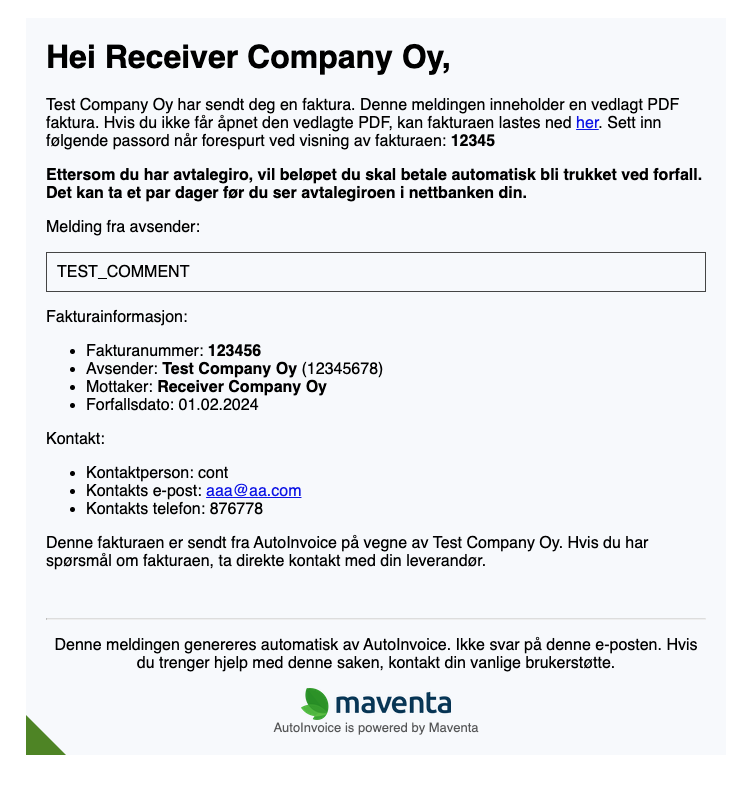
Notification via email
If the consumer wants a notification and does not have eFaktura active, the notification is sent as email if an address is available. The email text specifies that this is a direct debit to prevent accidental double payment.
Example AvtaleGiro notification email body.
Notification via print
If the consumer wants a notification and neither eFaktura nor an email address is available, the notification is sent to print. Maventa adds a cover sheet to the invoice specifying that this is a direct debit and should not be paid.
Sending an invoice as eFaktura to MPS
When consumer invoicing is active, you can start sending invoices. To send as eFaktura, the recipient must be registered in the Yes to All (JTTA) registry with MPS.
eFaktura validation
The following validation rules apply:
- Due date must be at least three days and at most one year in the future
- Payable amount must be a positive amount
- Bank account number must be 11 digits and pass the MOD 11 check
- KID must be 2–25 digits and pass the MOD 10 check
Sending an invoice as eFaktura to Vipps
eFaktura sends to both netbank and Vipps, as long as the consumer is registered in the JTTA registry and has not disabled receiving in Vipps. What is sent to netbank is also shown in Vipps. The invoice can be paid in either netbank or Vipps, but not both. Receiving invoices in Vipps only is not supported.
For a consumer to receive an invoice in Vipps:
- The consumer has activated Vipps eFaktura in the Vipps application
- The consumer has enabled Y2A in their netbank or Vipps application
The following edge cases apply:
- If the consumer has disabled invoice display in Vipps, the invoice is still sent to Vipps but only visible in netbank
- There is no scenario where an invoice is shown in Vipps only
- Credit notes are not supported in Vipps. Invoices with a total amount of 0 can be sent to Vipps.
- Direct debit invoices are not supported in Vipps
Status: When an invoice is sent to Vipps, it is validated and delivered to the consumer’s application within approximately 15 minutes, where it appears under the payment section. The status in Vipps is then pending; the status in Maventa is sent, which is the final status. The invoice remains in the application until 14 days after the due date, after which it is removed.
ERPs using the invoice_create method cannot send invoices to Vipps because the phone number cannot be stored in the database.
Sending an invoice to Digital Postkasse Innbygger (DPI)
To enable Maventa to send digital post to consumers on your behalf, your organisation must first have an agreement with Digdir for DPI. This is done outside Maventa, directly with Digdir. Then, log in to Altinn and delegate the right to send DPI to Visma Software International AS (contract counterparty for Maventa). Maventa provides the technical delivery. Once this delegation is in place, no further setup is needed.
Detailed instruction on the Altinn side:
- Log in to Altinn: https://www.altinn.no/
- Select the organisation you are representing
- Click “Profile” in the top menu
- Click “Access to the programming interface – API”
- Click “Grant and remove API access”
- Click “Delegate new API”
- Select the API called “Delegate the right to send DPI messages on behalf of the organisation” by searching for “dpi” in the search field
- Click the plus sign to the right of the organisation’s name
- Click “Next”
- Search for the organisation that should be granted the right to send DPI by organisation number (Visma’s organisation number: 980858073)
- Click the plus sign to the right of the organisation’s name and organisation number
- Click “Next”
- Click “Confirm”
When sending to DPI, the payload must contain a social security number (personnummer) either provided in a .aix file or as a parameter in the metadata. The SSN is used to check the consumer against the Kontakt og Reservasjonsregisteret (KRR). The consumer specifies in KRR whether they want to receive digital post and whether their account is in eBoks or DigiPost.